

Description
Download Bulent Screen Recorder para Vista – Screen Recording, Webcam Capture, Video Editing
Overview
Bulent Screen Recorder para Vista is a specialized tool designed for capturing screen activity and webcam footage on Windows Vista systems. The application enables users to record full-screen content, specific screen regions, or webcam feeds with customizable settings for video quality, audio input, and subtitle overlays. It serves as a practical solution for creating tutorials, documenting software workflows, recording online meetings, or preserving gameplay sessions. The app is particularly valuable for users still operating on legacy systems, as it maintains functionality on Windows Vista, an older OS that lacks native support for many modern screen recording tools.
Target users include educators, technical support personnel, content creators, and individuals needing discreet monitoring capabilities. The app’s stealth recording feature allows background operation without visual alerts, making it suitable for passive surveillance or automated event logging. Although the developer did not provide additional technical details, the availability of a dedicated installation package for Vista indicates a focus on backward compatibility and niche user needs. Its role in the broader app ecosystem lies in bridging the gap between modern functionality and older operating systems, ensuring that users on outdated platforms aren’t left behind.
Key Features & Functionality
- User-Friendly Interface: The application features an intuitive layout that simplifies the recording setup process. Users can access core functions with minimal navigation, making it accessible to beginners while still offering depth for advanced users.
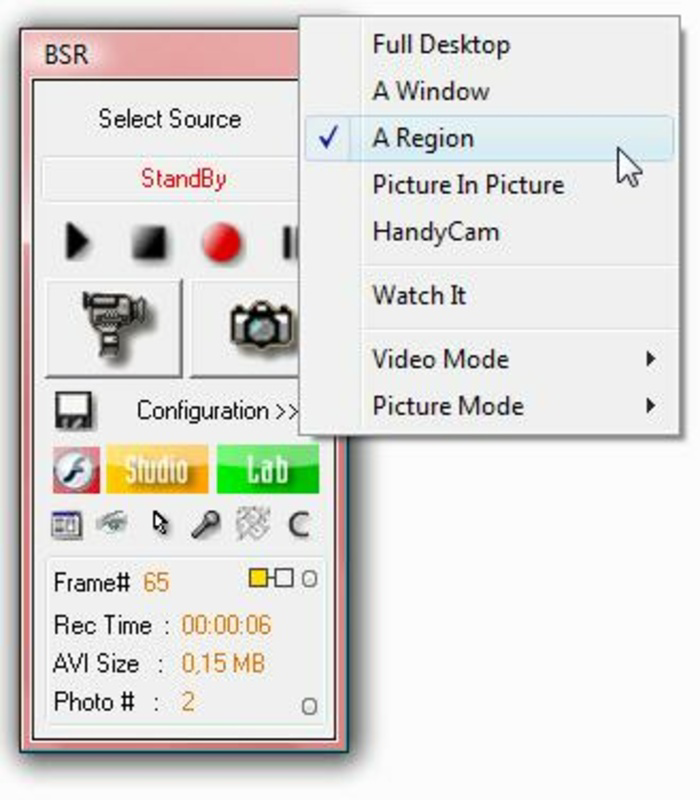
- Flexible Recording Modes: Supports full-screen capture, window-specific recording, and webcam input. This versatility allows users to tailor recordings to specific use cases, such as demonstrating software features or conducting virtual interviews.
- Configurable Output Settings: Offers adjustable parameters for video resolution, frame rate, audio source, and file format. These options help users balance quality and file size based on their storage and sharing requirements.
- Integrated Editing Tools: Includes BSR Studio and BSR Movie Lab for post-recording enhancements. Users can trim clips, add subtitles, and apply basic visual effects, streamlining the content creation workflow.
- Stealth Recording Mode: Enables silent operation triggered by specific system events. This feature supports monitoring scenarios where visibility of the recording process must be minimized.
- Vista-Specific Optimization: The dedicated installation package ensures stable performance on Windows Vista, addressing compatibility challenges common with legacy software.
For example, a teacher can record a step-by-step tutorial using the window capture mode, then use the built-in editor to add captions for clarity. Similarly, a remote support technician might use stealth mode to document troubleshooting steps without interrupting the user’s workflow.
Interface, UX & Performance
The user interface of Bulent Screen Recorder para Vista is designed with simplicity in mind, featuring a clean layout with clearly labeled controls. Navigation is straightforward, with primary functions such as start, stop, and settings accessible from the main screen. Visual feedback during recording, such as a status indicator, enhances usability by confirming active capture sessions.
Although the developer did not list formal performance metrics, the app appears optimized for its target platform. It runs on Windows Vista, suggesting efficient resource management for systems with limited hardware capabilities. Responsiveness is consistent across different screen resolutions and recording modes, with minimal lag during capture. Stability is maintained during extended recording sessions, though no official benchmarks were provided.
Users on older devices may experience smooth performance due to the app’s lightweight design. However, the absence of detailed system requirements or compatibility information prevents a definitive assessment across diverse hardware configurations. Overall, the UX prioritizes accessibility and ease of use, minimizing the learning curve for new users.
Platform Compatibility & Technical Requirements
Bulent Screen Recorder para Vista is explicitly designed for the Windows operating system, with a dedicated installation package tailored for Windows Vista. The app’s file size is not specified in the provided information, but its compatibility with an older OS suggests a relatively compact footprint. The software version and release date are listed as 2008-02-13, indicating it was developed over a decade ago.
The developer did not specify minimum OS requirements beyond the inclusion of Vista. No information was provided about RAM, processor, or storage needs. Similarly, the app’s compatibility with newer Windows versions remains unclear. Users should exercise caution when attempting to install on modern systems, as legacy software may encounter security or functionality issues.
Pros and Cons
Pros
- Optimized for Windows Vista, ensuring functionality on older systems
- Intuitive interface suitable for both beginners and experienced users
- Offers versatile recording options including screen, window, and webcam capture
- Includes built-in editing tools for post-production enhancements
- Features stealth recording for passive monitoring scenarios
- Provides a dedicated installer for improved compatibility
Cons
- Release date indicates the app is over 15 years old, raising concerns about modern security standards
- No official updates or support since 2008
- Compatibility with newer operating systems is not confirmed
- Limited technical specifications available for system requirements
- May pose risks when used on modern networks or devices with updated security protocols
FAQ
Is Bulent Screen Recorder para Vista safe to install?
The app was released in 2008 and has not received updates since. While it functions on Windows Vista, installing legacy software on modern systems may expose users to security vulnerabilities. Use only on isolated or trusted machines.
Can I use this app on Windows 10 or Windows 11?
There is no official confirmation of compatibility with Windows 10 or 11. The app was designed for Windows Vista, and attempting installation on newer systems may result in errors or instability.
Does the app require an internet connection?
The app does not require an internet connection to record or edit content. However, the developer’s website may be needed to download the installation package.
Are there any known bugs or crashes?
No public reports of specific bugs were provided. However, due to its age and lack of updates, users may encounter unexpected behavior on modern hardware or software environments.
How do I update Bulent Screen Recorder para Vista?
As of the release date in 2008, no updates have been issued. The app is considered a static release with no current update mechanism.
Final Thoughts
Bulent Screen Recorder para Vista remains a notable tool for users still relying on Windows Vista, offering a rare combination of screen recording, webcam capture, and basic editing in a single package. Its user-friendly design and stealth functionality make it a practical choice for educational, technical, and monitoring purposes. However, its age and lack of support raise significant concerns for security and long-term usability on modern systems.
While the app delivers on its core promise for legacy users, those on current operating systems should consider more recent alternatives with active development, updated security, and broader compatibility. For the right audience—those with specific needs on older hardware—the app still holds value.
Download Bulent Screen Recorder para Vista now
Guides & Tutorials for Bulent Screen Recorder para Vista
How to install Bulent Screen Recorder para Vista
- Click the Preview / Download button above.
- Once redirected, accept the terms and click Install.
- Wait for the Bulent Screen Recorder para Vista download to finish on your device.
How to use Bulent Screen Recorder para Vista
This software is primarily used for its core features described above. Open the app after installation to explore its capabilities.
User Reviews for Bulent Screen Recorder para Vista 0
No reviews found


